Page 1 of 1
Google Chrome
Posted: Sun Sep 30, 2012 8:36 am
by Yarjka
Question #69091
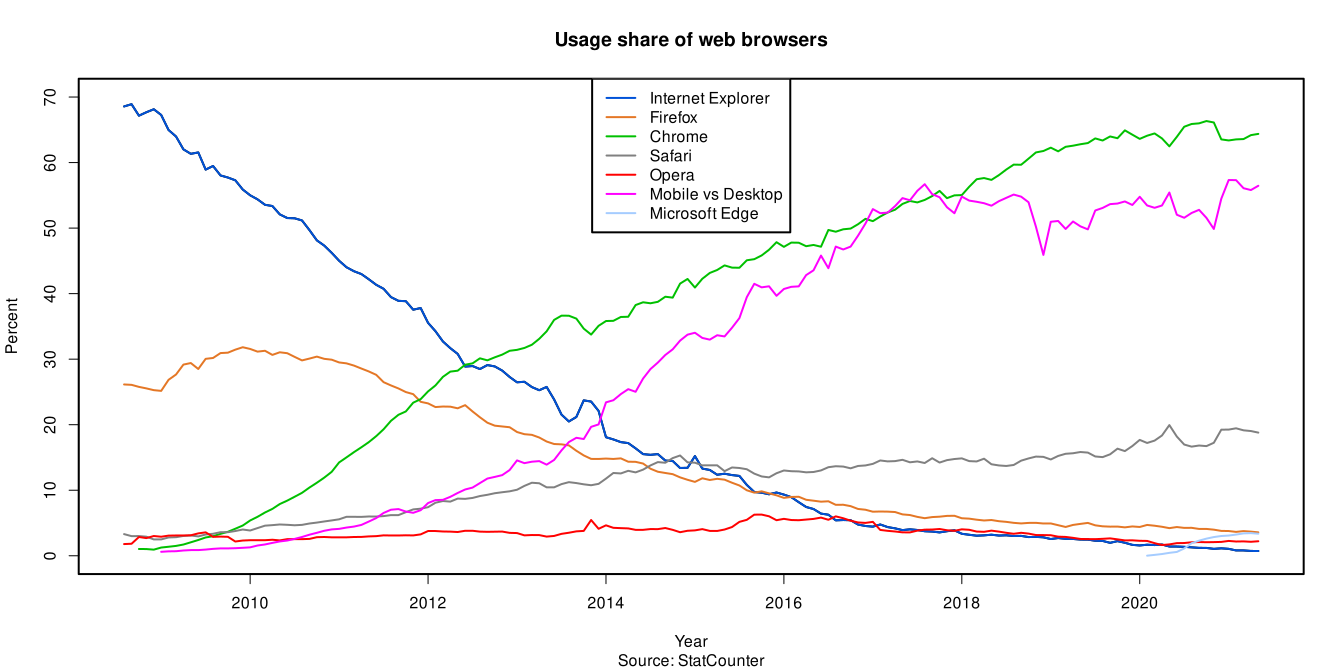
When did everyone start using Google Chrome? I'm a Firefox user myself, but I thought that IE still had the largest share of internet users, followed by Firefox and then Chrome. Has Chrome really taken over?
I tried Chrome and actually liked it quite a bit, but my wife uses Chrome and it's easier to share a computer if we each have separate browsers we can personally customize, so I've stuck with Firefox, which I think I like better than Chrome anyway.
Re: Google Chrome
Posted: Sun Sep 30, 2012 9:33 am
by Giovanni Schwartz
I believe that IE still has the largest market share, but that Chrome and Firefox are more popular among tech savvy people. And I know for sure that sometime in the last two years, Chrome rocketed past Firefox's market share. I would also like to state that I used to use Chrome when its market share was below 2%
Re: Google Chrome
Posted: Sun Sep 30, 2012 9:33 am
by NerdGirl
I use chrome because it seems to be faster than firefox on my computer.
Re: Google Chrome
Posted: Sun Sep 30, 2012 9:56 am
by Giovanni Schwartz

Oh ya: Blue is IE, Green is Chrome, Yellow is Firefox, and red is Opera.
http://en.wikipedia.org/wiki/Usage_shar ... b_browsers
According to this, Chrome is even ahead of IE now.
Re: Google Chrome
Posted: Sun Sep 30, 2012 10:27 am
by Digit
Sometimes I use Lynx via xterm when I'm in a minimalist mood.
Re: Google Chrome
Posted: Sun Sep 30, 2012 10:33 am
by Yarjka
This graph is incredible. I had no idea Chrome had jumped up so quickly. Interesting to see Firefox staying steady through the shift.
Re: Google Chrome
Posted: Sun Sep 30, 2012 1:06 pm
by Katya
I'll be honest, the only reason I asked that question was because I wanted to brag that Adobe Illustrator is currently one of my most used programs. And now I have accomplished that.
Re: Google Chrome
Posted: Sun Sep 30, 2012 4:00 pm
by Emiliana
Katya wrote:I'll be honest, the only reason I asked that question was because I wanted to brag that Adobe Illustrator is currently one of my most used programs. And now I have accomplished that.
Nice.
What do you use it for?
Re: Google Chrome
Posted: Sun Sep 30, 2012 5:27 pm
by Katya
Emiliana wrote:Katya wrote:I'll be honest, the only reason I asked that question was because I wanted to brag that Adobe Illustrator is currently one of my most used programs. And now I have accomplished that.
Nice.
What do you use it for?
I'm on a library committee that makes posters to advertise services and events. I had to make four posters in the last month, so I've been working in Illustrator several times a week.
Here's one poster that I made (although I put a lot more work into this one than most):
https://www.facebook.com/photo.php?fbid ... =1&theater
Re: Google Chrome
Posted: Sun Sep 30, 2012 6:45 pm
by Genuine Article
I love Chrome because if I sign into it on a different computer it remembers my bookmarks.
Re: Google Chrome
Posted: Sun Sep 30, 2012 7:47 pm
by Emiliana
Katya wrote:Emiliana wrote:Katya wrote:I'll be honest, the only reason I asked that question was because I wanted to brag that Adobe Illustrator is currently one of my most used programs. And now I have accomplished that.
Nice.
What do you use it for?
I'm on a library committee that makes posters to advertise services and events. I had to make four posters in the last month, so I've been working in Illustrator several times a week.
Here's one poster that I made (although I put a lot more work into this one than most):
https://www.facebook.com/photo.php?fbid ... =1&theater
Ooh, I like it.
Re: Google Chrome
Posted: Sun Sep 30, 2012 8:18 pm
by Yarjka
Katya wrote:Emiliana wrote:Katya wrote:I'll be honest, the only reason I asked that question was because I wanted to brag that Adobe Illustrator is currently one of my most used programs. And now I have accomplished that.
Nice.
What do you use it for?
I'm on a library committee that makes posters to advertise services and events. I had to make four posters in the last month, so I've been working in Illustrator several times a week.
Here's one poster that I made (although I put a lot more work into this one than most):
https://www.facebook.com/photo.php?fbid ... =1&theater
Ooh, I also work in a library and wouldn't mind knowing how to make snazzy posters. Is there a tutorial or something you could recommend for me?
Re: Google Chrome
Posted: Mon Oct 01, 2012 6:13 am
by Katya
Yarjka wrote:Ooh, I also work in a library and wouldn't mind knowing how to make snazzy posters. Is there a tutorial or something you could recommend for me?
I was already familiar with Photoshop before I tried to learn Illustrator, so that helped with the basic Adobe learning curve (which is very steep). Beyond that, I worked through a few chapters of Adobe Illustrator CS2, which is part of Adobe's Classroom in a Book series. (They've presumably got a newer edition out, now that we're up to CS5.)
I haven't learned to do a lot of fancy vector stuff in Illustrator yet; I mostly find one dynamic image I like, work with it in Photoshop, then import it to Illustrator and do the type there. (The biggest discovery I've made in the last year is that Photoshop's dry brush filter is incredibly useful when trying to size up an image. Resize the image in Photoshop (to where it looks pixellated), then apply the dry brush filter and suddenly it looks sort of impressionistic instead of pixellated.)
Re: Google Chrome
Posted: Mon Oct 01, 2012 6:57 am
by Digit
I found something that works for can't-afford-Adobe-software me when I have a small .png or .jpg that I want to size up. I go to
this site, which will convert .pngs or .jpgs into EPS or PDF format using its rast2vec algorithm, I choose PDF, open the PDF in Acrobat, and can now magically zoom in with the now-vectorized image not getting pixelated. When it's as big as I want it, I take a screen shot and copy it back into GIMP.
Re: Google Chrome
Posted: Mon Oct 01, 2012 9:45 am
by Yarjka
Katya wrote:Yarjka wrote:Ooh, I also work in a library and wouldn't mind knowing how to make snazzy posters. Is there a tutorial or something you could recommend for me?
I was already familiar with Photoshop before I tried to learn Illustrator, so that helped with the basic Adobe learning curve (which is very steep). Beyond that, I worked through a few chapters of Adobe Illustrator CS2, which is part of Adobe's Classroom in a Book series. (They've presumably got a newer edition out, now that we're up to CS5.)
I haven't learned to do a lot of fancy vector stuff in Illustrator yet; I mostly find one dynamic image I like, work with it in Photoshop, then import it to Illustrator and do the type there. (The biggest discovery I've made in the last year is that Photoshop's dry brush filter is incredibly useful when trying to size up an image. Resize the image in Photoshop (to where it looks pixellated), then apply the dry brush filter and suddenly it looks sort of impressionistic instead of pixellated.)
Thanks for the info. I'll keep playing around with Photoshop for now.
Re: Google Chrome
Posted: Mon Oct 01, 2012 2:25 pm
by Laser Jock
Yarjka wrote:Question #69091
When did everyone start using Google Chrome? I'm a Firefox user myself, but I thought that IE still had the largest share of internet users, followed by Firefox and then Chrome. Has Chrome really taken over?
I tried Chrome and actually liked it quite a bit, but my wife uses Chrome and it's easier to share a computer if we each have separate browsers we can personally customize, so I've stuck with Firefox, which I think I like better than Chrome anyway.
You can actually have two totally different profiles with Chrome. That is, all browser history, which websites you're logged into, your personal settings, bookmarks, and plugins are all completely separate. So if you want to both use Chrome, you can, with no hassle.
To set up a new profile, go to [wrench icon] -> settings, and under the "Users" section click "Add new user." Then you can each have your own profile running at the same time. I do this to keep my work-related stuff separate from my personal stuff (e.g., I can be logged into my personal Gmail and my work Gmail at the same time), and it works nicely for me. (For more information, the official help page for multiple profiles is
here.)
(Obviously if you like Firefox better, that's fine, but if juggling multiple people's preferences is the issue, they have a nice solution.

)
Firefox
also appears to have something similar, though I've never used it. (Internet Explorer and Safari do not support multiple profiles as far as I can tell.)
Re: Google Chrome
Posted: Mon Oct 01, 2012 4:31 pm
by Yarjka
Laser Jock wrote:Yarjka wrote:Question #69091
When did everyone start using Google Chrome? I'm a Firefox user myself, but I thought that IE still had the largest share of internet users, followed by Firefox and then Chrome. Has Chrome really taken over?
I tried Chrome and actually liked it quite a bit, but my wife uses Chrome and it's easier to share a computer if we each have separate browsers we can personally customize, so I've stuck with Firefox, which I think I like better than Chrome anyway.
You can actually have two totally different profiles with Chrome. That is, all browser history, which websites you're logged into, your personal settings, bookmarks, and plugins are all completely separate. So if you want to both use Chrome, you can, with no hassle.
Helpful information, thanks. I'll look into it.
Re: Google Chrome
Posted: Mon Oct 01, 2012 8:57 pm
by bobtheenchantedone
Firefox does have something similar. That way I can always have both my personal email and my work email up at the same time. : )